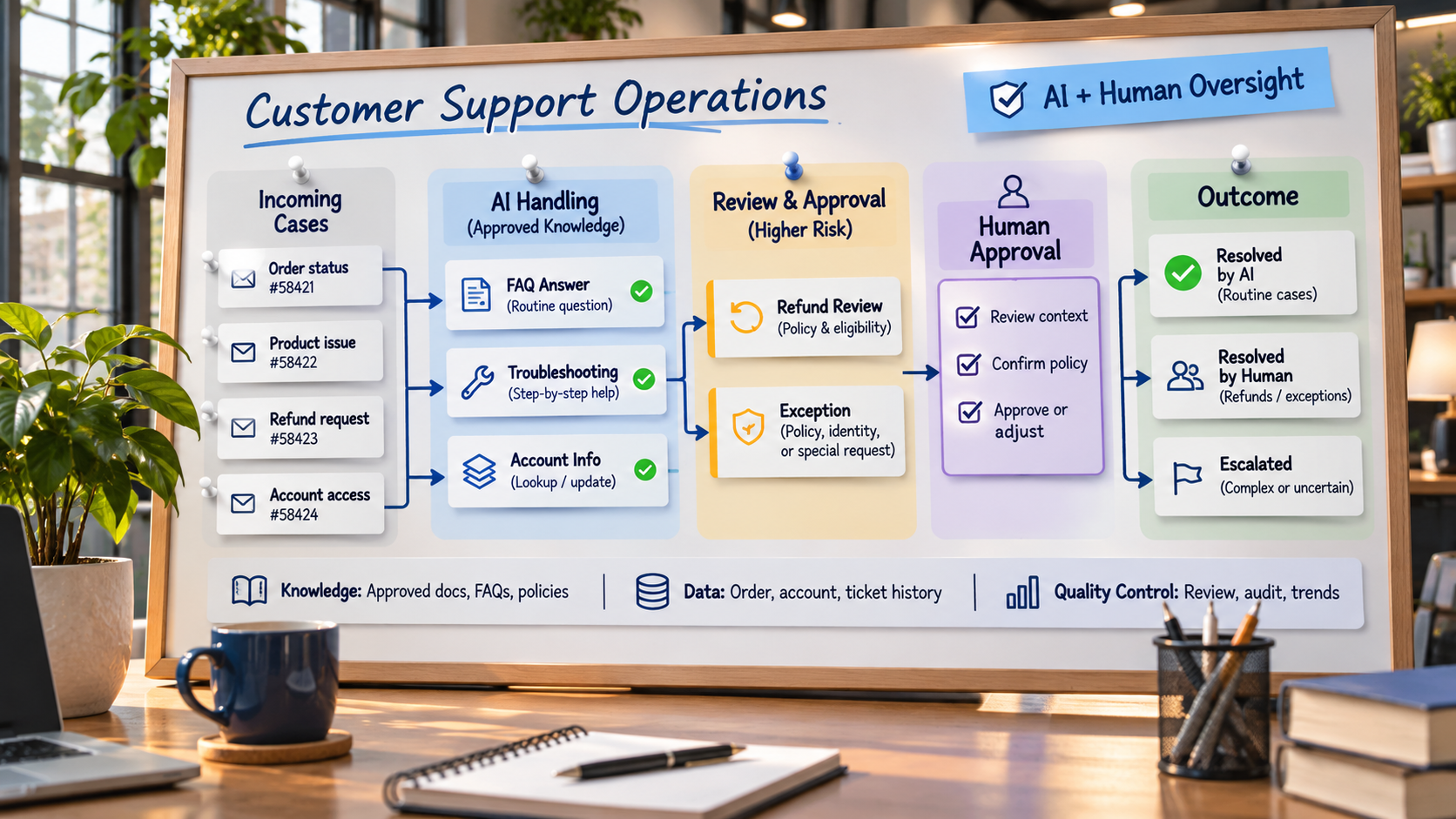

Zoho introduced Blended Agents with human approvals; Zendesk began rolling out custom agents; Intercom made Fin classifications inspectable; and Gorgias added refund limits for human agents. These AI support tool updates affect ticket routing, escalation and financial controls. Small teams should test Intercom and Gorgias only within existing setups, while checking Zoho and Zendesk availability before granting more authority.
AI Support Tool Updates: Decision Table
| Tool / update | Support job | AI authority | Escalation | Quality control | Stack overlap | Test | Decision |
|---|---|---|---|---|---|---|---|
| Zoho Desk Blended Agents | FAQ, account lookup, human handoff | Level 4 possible: update records | Human takeover and approval | Observability advertised; verify detail | High if another helpdesk is in place | Read-only historical cases if enabled | MONITOR |
| Zendesk custom agents | Ticket triage and policy-exception review | Level 4 possible with approved actions | Configured workflows and approvals | Ticket review and execution records | Strong overlap with existing Zendesk tools | Read-only ticket audit if eligible | MONITOR |
| Intercom Fin attribute provenance | Classify conversations and inspect routing | Level 4 for metadata changes; not new refund authority | Configured escalation rules | Attribute owner, explanation, conversation events | Native to Fin | Compare labels against known cases | TEST |
| Gorgias Shopify refund controls | Enforce human refund limits | No new AI refund permission established | Above-limit refunds blocked | Mandatory reasons and 30-day human refund export | Native to Gorgias | Configuration review; no live refunds | TEST |
Decision rule: Test only inside an existing support stack. For broader software selection, see our AI customer support tools guide. A new feature is not automatically a reason to migrate.
1. Zoho Blended Agents: Human Review Beside AI Execution
What changed and who should care
On November 16, Zoho announced Blended Agents for Zoho Desk. The company says its Zia-based agents can retrieve order information, consult uploaded documents and connected applications, update customer records, and hand a conversation to a representative with its history intact. Human representatives can pause execution to inspect or approve an action. The fit is an existing Zoho Desk team handling routine order or account questions. These are Zoho’s announced capabilities, not independently measured results.
Knowledge, authority, escalation and risk
Approved documents and connected apps may supply order and account context. This moves into Level 4: ACT when record updates are enabled. Zoho describes human handoff and approval, but the announcement does not specify universal confidence thresholds, refund ceilings, or a complete action-by-action audit standard. Keep policy exceptions, identity disputes and refunds with a human.
Availability warning: Zoho’s announcement says Blended Agents start with Express, while its published plan comparison lists AI Agents under Standard. Model usage can still be billed. Confirm access and token terms before budgeting.
60-minute test, seven-day action and decision
If enabled, run 10 anonymized historical cases using approved knowledge and read-only data. Record mistakes and missed handoffs; allow no record changes. Within seven days: request a plan/permission confirmation and document the approval boundary for one support workflow. Who should skip it: businesses already satisfied with another helpdesk, or unable to restrict customer-data access. Decision: MONITOR until access and governance are confirmed.
2. Zendesk Custom Agents: Define Procedures Before Granting Actions
What changed and who should care
Zendesk announced custom-agent general availability on November 11, rolling out through November 19. Administrators define procedures, approved articles and tools, then trigger agents through action flows. Examples include policy-exception checks, attachment extraction and solved-ticket audits. This suits existing Zendesk teams, not first-time chatbot buyers. See the November 11 release notice.
Knowledge, authority, escalation and risk
Agents start with no article, tool or action access. Administrators must grant it; a ticket ID is required. Read-only audits fit Levels 1–3; writing tickets or external records is Level 4: ACT. Advanced action flows, announced November 13, can pause for approvals. The technical documentation describes configurable input, tools and read/write access.
Availability warning: technical documentation still includes early-access enrollment language despite the general-availability announcement. The staged rollout was not scheduled to finish until November 19. Check your account. A refund-review procedure does not itself authorize a refund.
60-minute test, seven-day action and decision
If eligible, run 10 closed tickets to flag missing information. Disable customer replies and all writes. Check results and execution history. Within seven days: document approved articles, read/write permissions, one human approval step and a failure stop condition. Who should skip it: teams without Zendesk or with low ticket volumes that make setup and migration uneconomic. Decision: MONITOR until rollout and access are clear.
3. Intercom Fin: See Who Classified a Conversation—and Why
What changed and who should care
On November 13, Intercom added provenance details for conversation attributes. In the Inbox, teammates can see who last set a value and when. For attributes detected by Fin, they can also request an explanation; Fin-handled conversations show an outcome state. A wrong category can misroute a billing complaint. See the November 13 changelog.
Knowledge, authority, escalation and risk
Fin can use approved help content to answer questions. Here the relevant data is conversation metadata such as issue type or urgency. Fin can write classifications into workflow metadata, but the new audit view does not grant new refund or account authority. Configured escalation rules can hand off cases. Verify the label against the transcript and resulting human queue.
An explanation shown on demand is not necessarily a record of the original classification decision. Intercom’s Fin Attributes documentation points to conversation events for the decision-time record. An explanation does not prove accuracy.
60-minute test, seven-day action and decision
Review 15 historical conversations: five routine, five mixed-intent, five escalations. Compare labels with human outcomes, event history and final queues. Do not turn on new customer-facing actions. Within seven days: audit one high-risk category—such as billing—and correct any unreliable routing rule. Who should skip it: teams not using Fin, or those with few enough tickets to classify reliably by hand. Decision: TEST inside the existing Intercom workspace; otherwise KEEP CURRENT TOOL.
4. Gorgias: Refund Caps Are a Human-Agent Control, Not an AI Refund License
What changed and who should care
On November 12, Gorgias introduced configurable maximum refund amounts and required refund reasons for Shopify stores. Human agents are blocked from confirming refunds above the configured cap. Administrators can export 30 days of human-agent refund activity, including associated items. The change matters to Shopify merchants refunding within the helpdesk. See the official update.
Knowledge, authority, escalation and risk
The policy is a limit configured by the business, based on Shopify order data and the requested refund amount. A human agent executes the refund; this release does not establish new AI authority. Gorgias separately documents AI Agent Shopify actions that can cancel unfulfilled orders and trigger refunds. The sources do not establish that the new human refund cap also constrains every autonomous AI action. Treat those permission paths separately until verified.
Caps cannot replace identity checks, duplicate-refund prevention or reconciliation. A 30-day export does not establish rollback support.
60-minute test, seven-day action and decision
Review caps, refund reasons and agent permissions. Test below-cap and above-cap scenarios in non-production only; otherwise inspect settings without moving money. Within seven days: establish a written refund threshold and manual exception path. Who should skip it: non-Shopify sellers and shops without Gorgias. Decision: TEST for existing Shopify/Gorgias teams, not as a reason to switch helpdesks.
What to Skip This Week
Intercom also announced new explanations for balanced conversation assignment on November 12. They can show why a ticket was assigned or remained in a queue. But balanced assignment requires the Expert plan, while historical queue analysis with Operator involves an additional Pro add-on. For many one-to-ten-person businesses, that is unnecessary complexity. SKIP an upgrade solely for routing explanations; keep the existing queue unless missed handoffs are a measured problem.
The 60-Minute Support Tool Test
Use 10–20 historical conversations with established correct outcomes: five FAQs, five troubleshooting requests, three policy or refund questions, three mandatory handoffs and a few ambiguous examples. Anonymize personal details. Connect only approved knowledge; start with read-only permissions.
- Minutes 0–10: Select cases and write down their verified outcomes.
- Minutes 10–20: Limit documents, customer fields and action permissions.
- Minutes 20–40: Run the cases without live customer replies or irreversible actions.
- Minutes 40–55: Score factual accuracy, policy fidelity, source evidence, handoffs and unsafe commitments.
- Minutes 55–60: Choose TEST further, MONITOR, KEEP CURRENT TOOL or SKIP.
Review failures first. A smooth answer to a common FAQ does not offset a wrong refund promise or a billing case that never reaches a person.
Escalation Before Automation; Quality Control Before Scale
Define when AI must stop before defining everything it can automate. Routine FAQ retrieval can be automated with approved, current documentation. Requests involving account security, billing disputes, policy exceptions, uncertain facts or repeated unsuccessful troubleshooting should have a visible human route. Customer-requested escalation must not turn into an endless automated loop. For a fuller design, see the AI support chatbot escalation guide.
Do not scale a workflow until you know how it fails. Initially review all escalations and account or refund actions, plus a sample of apparently resolved routine tickets. Record missed handoffs, reopened cases, unsupported answers and policy mistakes. Vendor-reported resolution rates are not comparable without matching definitions. Our AI quality gates framework covers the broader review architecture.
Keep authoritative customer facts in existing systems. New tools add synchronization, maintenance and permission risk. Ticket history, routing, macros and documentation are costly to migrate.
What to Watch Next
Check whether Zoho reconciles its Express-versus-Standard AI availability descriptions and publishes clearer action-level controls. Check completion of Zendesk’s staged rollout after November 19 and whether the early-access wording is removed. For Intercom, inspect whether the new provenance view helps correct actual routing errors. For Gorgias, seek explicit confirmation of whether human refund caps also govern each AI-driven Shopify refund path. Until those points are documented, do not widen permissions based on a demo.
Conclusion
The useful November changes are about decision boundaries. Intercom provides a more inspectable classification trail, and Gorgias gives Shopify operators tighter control over human refunds. Zoho and Zendesk show how much more customer work agents may perform—but account access and permission scope still need checking. The right support AI resolves well-grounded routine cases, stops when evidence is missing, and gets high-consequence decisions to a human.